Autofill Every Job Application In One Click
Swiftcruit Copilot fills job applications on Workday, Greenhouse, Lever and 12 more application systems from your Swiftcruit profile, drafts the open questions for you to read, and tracks every application. You review and submit, every time.
- Free with a Swiftcruit account
- 15 application systems
- You press submit
Works Where Employers Take Applications
Copilot fills application forms on the applicant tracking systems most companies use, from startups on Ashby to enterprises on Workday and SAP SuccessFactors.
- Workday
- Greenhouse
- Lever
- Ashby
- iCIMS
- SmartRecruiters
- Workable
- Jobvite
- BambooHR
- JazzHR
- Recruitee
- Rippling
- Taleo
- SAP SuccessFactors
- LinkedIn Easy Apply
Apply With Swiftcruit, Right On The Job Board
On LinkedIn, Indeed, Handshake and Welcome to the Jungle, Copilot adds an Apply with Swiftcruit button next to the job's own Apply button. Click it and Copilot takes you to the company's application form, ready to fill, and adds the job to your tracked applications.
Senior Backend Engineer
Acme Robotics · Austin, TX · Full-time
 Apply with Swiftcruit
Fill Long Application Forms From Your Profile
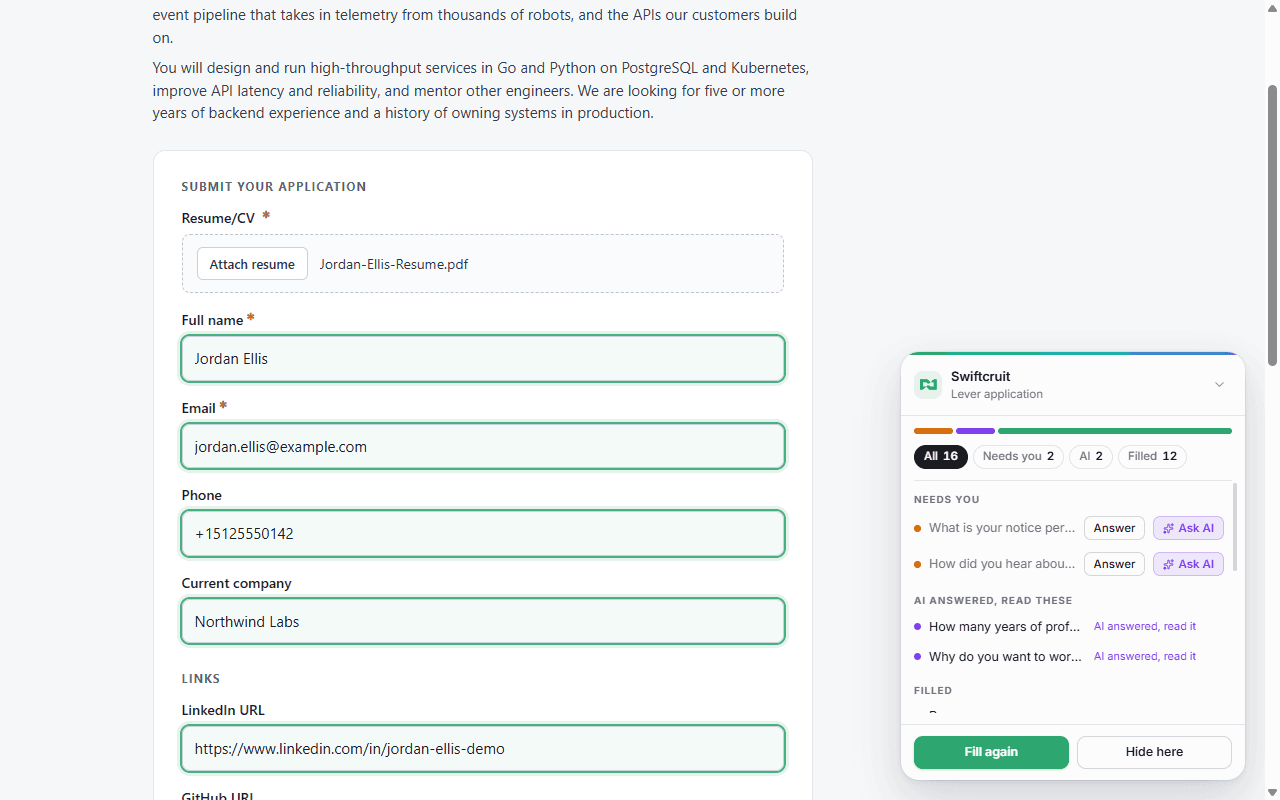
Click Autofill and Copilot fills your contact details, work history, education, links and resume from your Swiftcruit profile, including the custom dropdowns and typeahead fields that browser autofill skips.
- Every field it fills is ringed green, so you can see exactly what changed
- Questions it cannot answer are flagged amber in a Needs you list
- Edited your profile? Press Fill again and the form catches up
Draft Answers To The Questions Your Profile Can't Cover
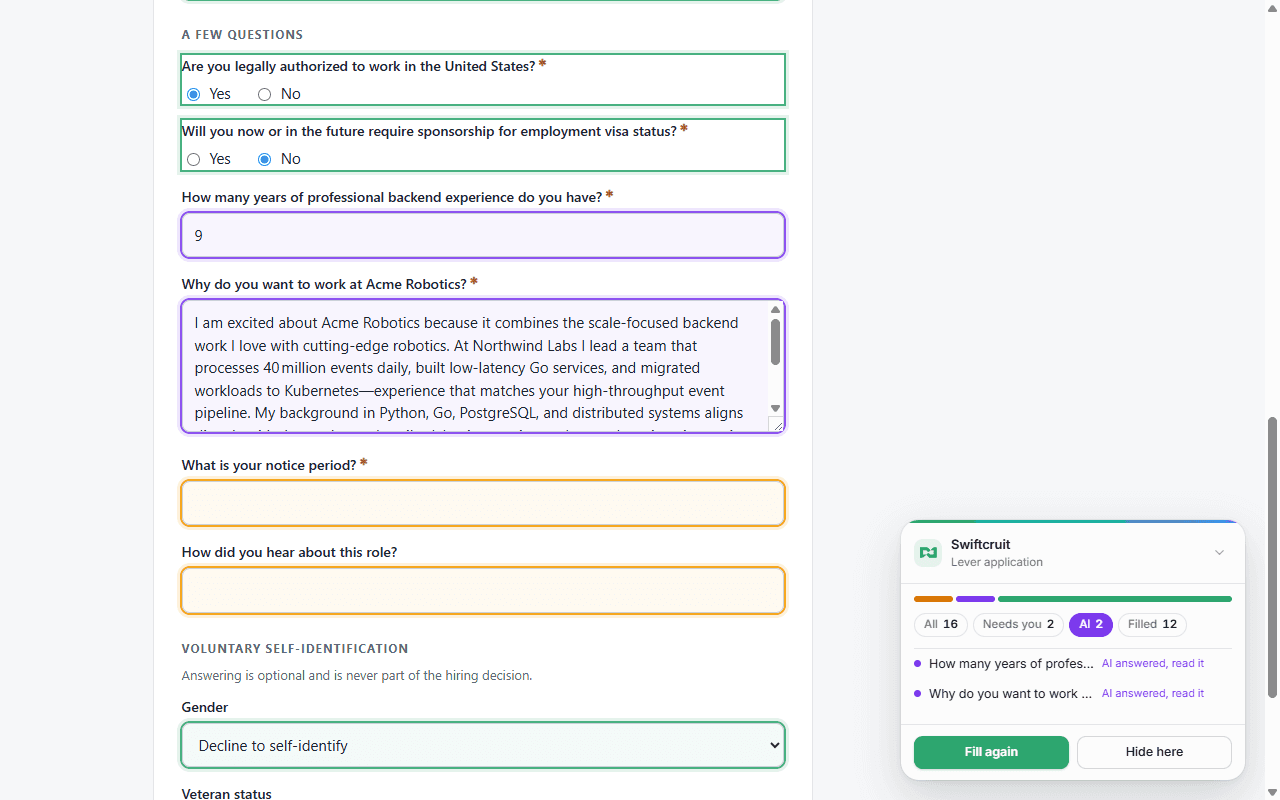
For open questions like "Why do you want to work here?", Copilot writes a first draft from your profile and the job description. You stay the author: read it, edit it, then submit.
- AI answers are ringed violet and listed for you to read
- Ask AI on any single question straight from the panel
- Work authorisation and self-identification questions are never sent to the AI
Answer A Question Once, Reuse It Everywhere
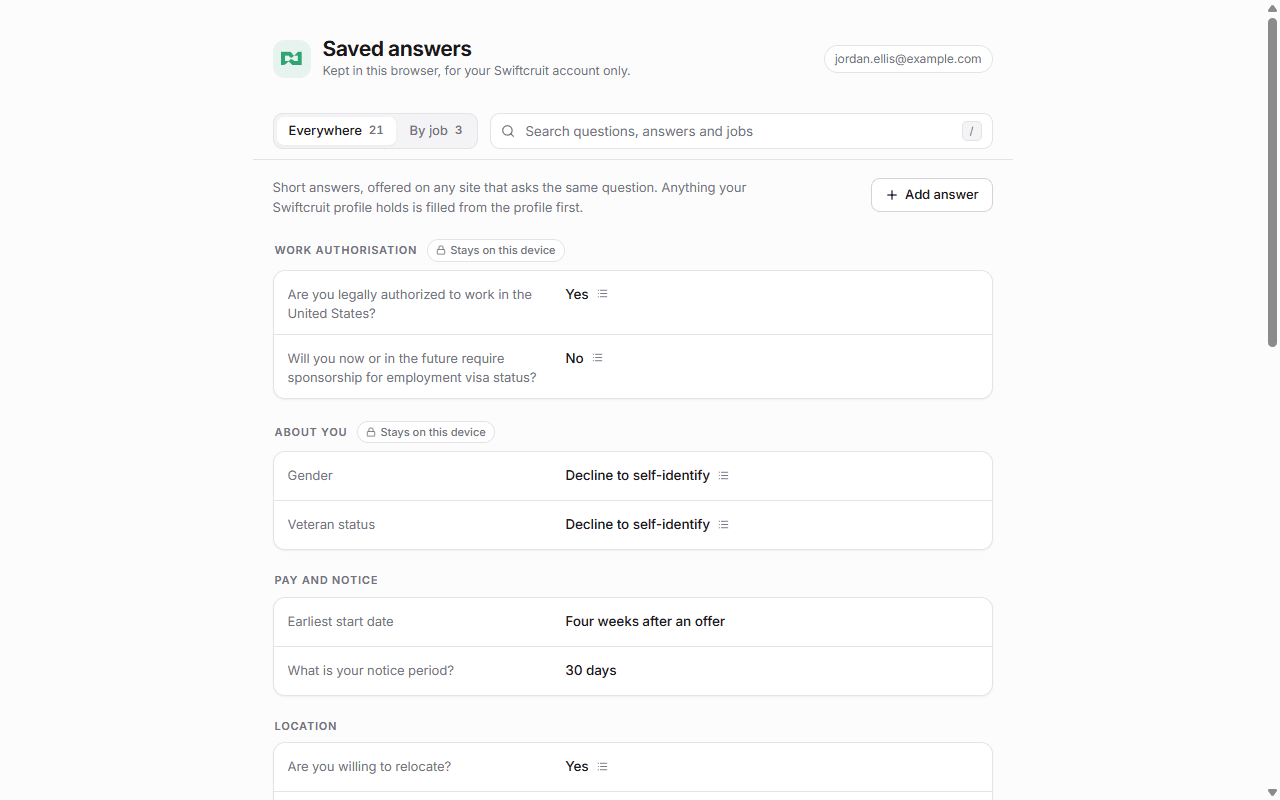
Notice period, earliest start date, relocation: the answers you type are remembered in your browser for your account and offered the next time any form asks the same question.
- View, edit, add, back up or delete answers on the Saved answers page
- Answers you gave for one job stay with that job
- Your Swiftcruit profile always answers first
Every Application, Tracked Automatically
Jobs you open, start and submit are listed under Tracked Applications in your Swiftcruit profile, so you always know where you applied and how far you got.
- An Apply with Swiftcruit button on LinkedIn, Indeed, Handshake, Welcome to the Jungle
- Copilot picks you up on the company's own application form
- Turn tracking off any time in the extension's settings
Set Up In Three Steps
- 01
Create your free Swiftcruit profile
Sign up and upload your resume. Swiftcruit reads it into your profile: work history, education, skills and links. The fuller your profile, the more of every form Copilot fills.
- 02
Add Copilot to Chrome
Install the extension from the Chrome Web Store and pin it to your toolbar. It signs in with your Swiftcruit account.
- 03
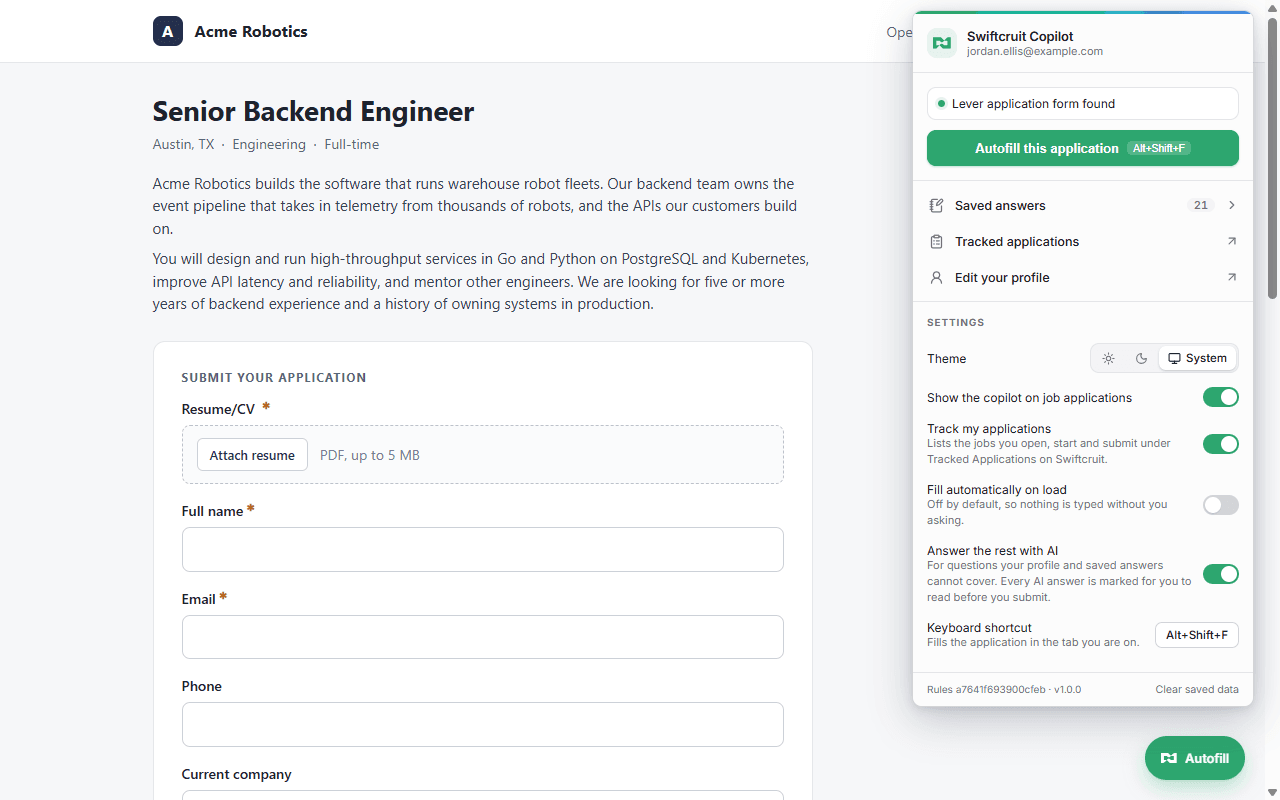
Open an application and click Autofill
The Copilot panel appears on supported forms. Click Autofill or press Alt+Shift+F, check every answer, then submit it yourself.
You Stay In Control Of Every Application
Copilot saves you the typing, not the judgement. Read how it handles your data in our Privacy Policy.
You always press submit
Copilot fills and marks the form. Sending an application is always your decision, never the extension's.
Nothing typed until you ask
Fill on load is off by default, so Copilot waits for you to click Autofill or press Alt+Shift+F.
Sensitive answers stay private
Work authorisation and self-identification answers are never sent to the AI, and your saved answers live in your browser.
Light on your browser
The autofill engine loads only on job application pages and job boards, so everyday browsing stays as fast as before.
Find Jobs Worth Applying To
Swiftcruit ranks open roles by how well they match your profile, lets you practise for a role, and tailors your resume to it. Copilot then fills the application.
Frequently Asked Questions
What is Swiftcruit Copilot?
Swiftcruit Copilot is a Chrome extension that fills in job applications on company career sites from your Swiftcruit profile. It drafts answers to open questions with AI for you to read, remembers the answers you type, and tracks every job you apply to.
Which job application sites does Copilot work on?
Copilot fills application forms on Workday, Greenhouse, Lever, Ashby, iCIMS, SmartRecruiters, Workable, Jobvite, BambooHR, JazzHR, Recruitee, Rippling, Taleo, SAP SuccessFactors and LinkedIn Easy Apply. On LinkedIn, Indeed, Handshake and Welcome to the Jungle it adds an Apply with Swiftcruit button next to the job's own Apply button.
Does Copilot submit applications for me?
No. Copilot fills the form and marks every field it touched, then you check the answers and press submit yourself. It never submits an application on your behalf.
How does Copilot answer application questions with AI?
When your profile and saved answers do not cover a question, such as "Why do you want to work here?", Copilot drafts an answer from your profile and the job description. Every AI answer is marked in violet so you read it before you submit, and you can switch AI answers off in the extension's settings.
What happens to the answers I type into application forms?
They are saved in your browser for your Swiftcruit account, so the next form that asks the same question fills faster. You can view, edit, add, back up or delete them on the Saved answers page. Answers to sensitive questions, such as work authorisation and self-identification, are never sent to the AI.
Do I need a Swiftcruit account to use Copilot?
Yes. Copilot fills forms from your Swiftcruit profile, so you need a free account. Upload your resume when you sign up and Swiftcruit fills in your profile from it: work history, education, skills and links.
Is Swiftcruit Copilot free?
Yes, Copilot is free today with a free Swiftcruit account.
How does Copilot track my job applications?
Jobs you open, start and submit with Copilot appear under Tracked Applications in your Swiftcruit profile, so you can see where you applied without keeping a spreadsheet. You can turn tracking off in the extension's settings.
Which browsers does Copilot support?
Copilot runs in Google Chrome on desktop, version 109 or later.
Spend Your Time On Interviews, Not Application Forms
Add Copilot to Chrome, open an application and let your Swiftcruit profile do the typing.